
Shoppu
Shoppu asistent virtual de cumpărături
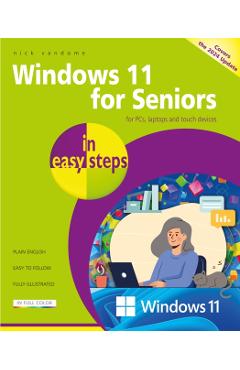
Windows 11 for Seniors in Easy Steps - Nick Vandome
Produs

Windows 11 for Seniors in Easy Steps - Nick Vandome

Brand: Nick Vandome · Categorie: Miscellaneous · Actualizat: 06.07.2026 02:03

105,23 lei116,92 lei

Ai ajuns la un produs concret. Îți pot spune rapid dacă merită, ce avantaje are și ce alternative similare găsești mai ușor.

Pe scurt: Windows 11 for Seniors in easy steps, 2nd edition is written with older citizens very much in mind. It will guide you through using Windows 11, a step at a time, and covers all the key features in the Windows 11 2024 up…

  • Îți pot recomanda rapid produse similare sau alternative mai bune din aceeași zonă.
  • Dacă nu e exact ce cauți, putem restrânge imediat opțiunile în funcție de preț, utilizare sau stil.
  • Poți deschide oferta din magazin sau poți continua aici conversația pentru comparații și recomandări.

Detalii despre produs

Windows 11 for Seniors in easy steps, 2nd edition is written with older citizens very much in mind. It will guide you through using Windows 11, a step at a time, and covers all the key features in the Windows 11 2024 update (24H2), including: \n Navigating the Desktop, Start button, and Start menu with ease, to feel comfortable getting around the Windows 11 interface and accessing items on your computer. \n Harnessing the power of Artificial Intelligence (AI) with the Copilot feature to easily find items on your computer and the internet. \n Staying connected with family and friends with the updated Outlook app that combines the Mail, Calendar, and People (address book) features. \n Using the Chat function within the Teams app to make video calls to family and friends, for face-to-face communication. \n Making the most of the range of settings in Windows 11, to customize it just the way you want. \n Using the Quick Settings panel to manage your most frequently accessed settings. \n In addition to covering all the features in the latest version of Windows 11, there is a new chapter entitled Getting Things Done, which covers some of the most common tasks that you can perform with Windows 11. These include: secure online shopping; booking a vacation; making money from online auction sites; printing photos; completing household accounts; creating effective letters; and connecting to the internet at home or on the move with a Windows 11 mobile device. \n Packed with tips throughout, this leading guide for seniors will help you get more out of Windows 11 - at your own pace! \nWindows 11 for Seniors in easy steps, 2nd edition is written with older citizens very much in mind. It will guide you through using Windows 11, a step at a time, and covers all the key features in the Windows 11 2024 update (24H2), including: \n Navigating the Desktop, Start button, and Start menu with ease, to feel comfortable getting around the Windows 11 interface and accessing items on your computer. \n Harnessing the power of Artificial Intelligence (AI) with the Copilot feature to easily find items on your computer and the internet. \n Staying connected with family and friends with the updated Outlook app that combines the Mail, Calendar, and People (address book) features. \n Using the Chat function within the Teams app to make video calls to family and friends, for face-to-face communication. \n Making the most of the range of settings in Windows 11, to cu

Produse similare pe care le poți explora

Poți scrie sau vorbi, dacă vocea este activată.